MIDI-AXE
The MIDI toolbox for musicians, developers and studio technicians.
MIDI-AXE is a modern, cross-platform MIDI utility for Windows and macOS. It monitors, routes, generates and analyzes MIDI data. It brings together the everyday tools of the classic MIDI utilities: a message monitor, a port router, a SysEx librarian, MIDI Clock and MTC sync, an on-screen keyboard and a controller surface. It adds a modern, scalable interface and port management that adapts to USB devices being plugged in and out.
Whether you’re troubleshooting a controller, backing up a synth’s patches, syncing gear or just checking what your hardware is really sending, MIDI-AXE shows you what is happening on your MIDI ports.
Key Features
Smart MIDI port management
- Port selections are remembered by name across sessions, even when a device isn’t connected.
- Ports that disappear (e.g. a USB device being unplugged) are reopened automatically as soon as they come back, even after restarting the app.
- Each port gets a stable number and its own color, used throughout the app.
- Ports busy in other applications are retried automatically.
MONITOR mode
- One click opens every MIDI input, including devices connected later.
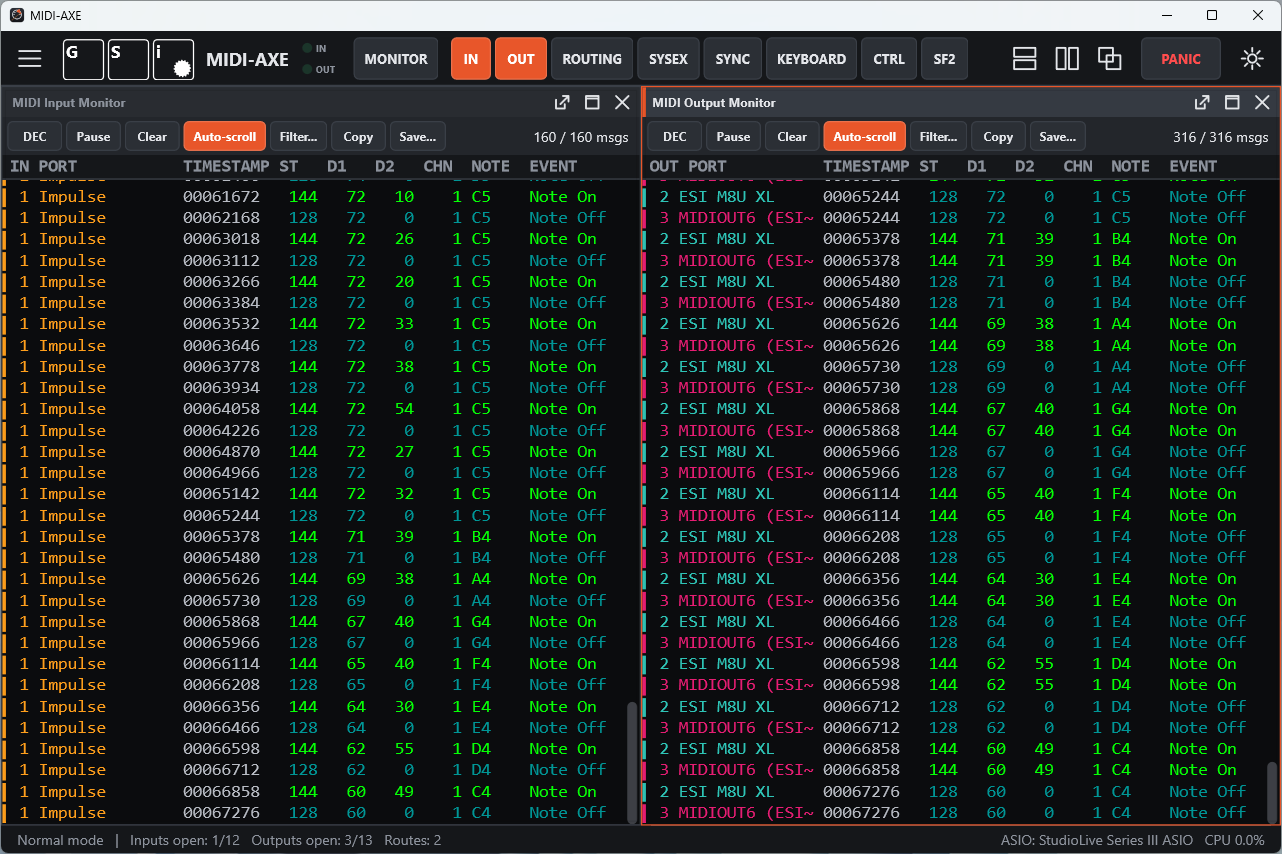
- All incoming traffic is shown in a single window, with the port name and color in the first column.
MIDI monitors
- Separate Input and Output monitors. Both show the port each message comes from or goes to.
- Monospaced, color-coded display in the classic MIDI-OX style, with customizable colors for both themes.
- HEX or DEC display for every byte, status included.
- SysEx messages are shown in full. Double-click one to open it in its own window, copy it, or send it to the SysEx scratchpad.
- Filters by message type and channel. Active Sensing is hidden by default.
- Pause, auto-scroll, copy to clipboard, save the log to a text file.
- Configurable history (up to 250,000 lines), timestamps in milliseconds or hh:mm:ss.mmm.
Routing matrix
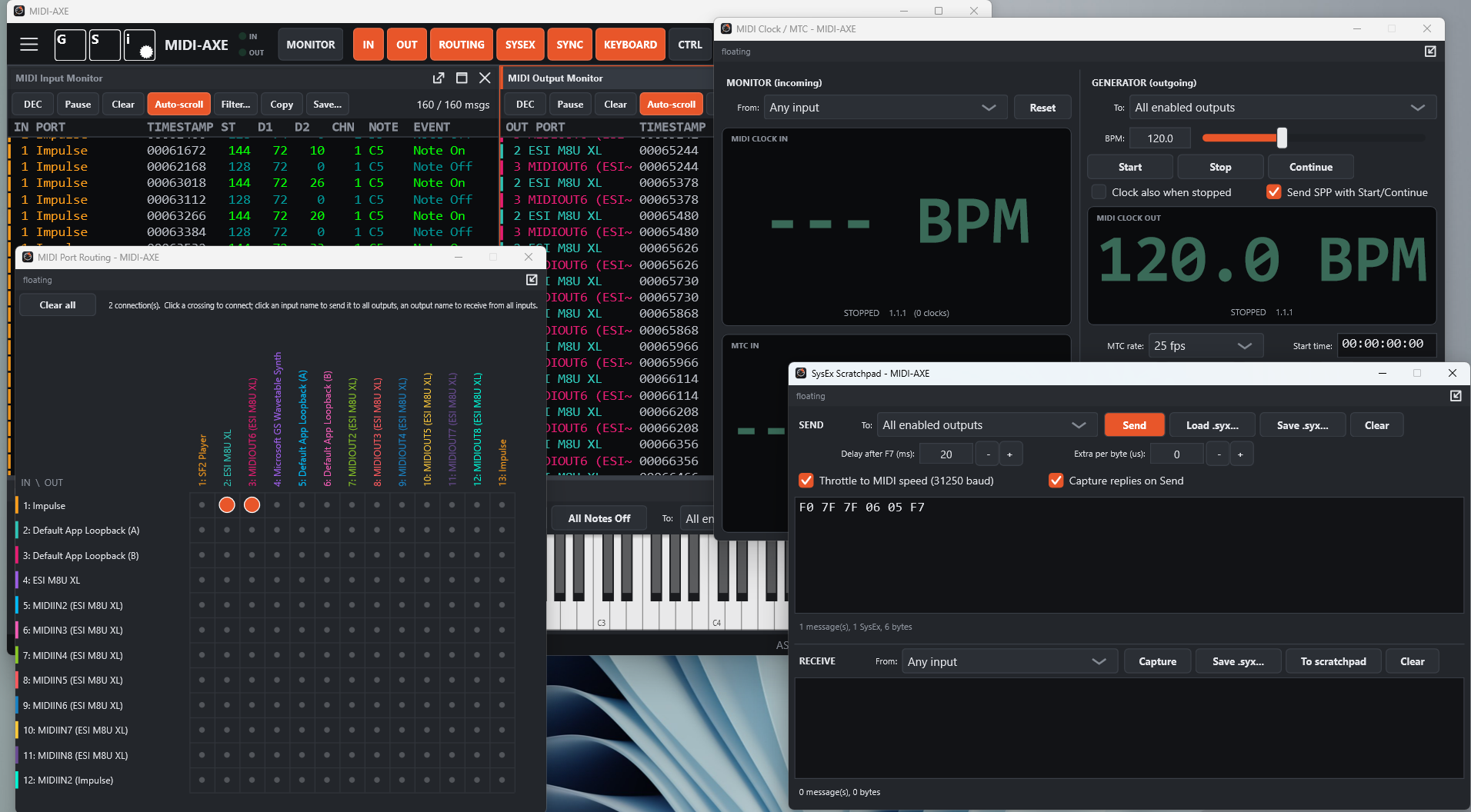
- A grid of inputs × outputs: click a crossing to connect two ports.
- Route one input to all outputs, or all inputs to one output, with a single click.
- Routings are saved and restored with your session.
SysEx scratchpad
- Type or paste hex data freely, with comments.
- Load
.syx, .mid (SysEx events are extracted) and .txt files; save to .syx.
- Send to one port or to all enabled outputs.
- Timing control for slow devices: delay after each message, extra delay per byte, and throttling to real MIDI cable speed (31,250 baud).
- Receive and save SysEx dumps, optionally capturing replies automatically when you send a request.
MIDI Clock & MTC
- Monitor: incoming BPM, Start/Stop/Continue, Song Position Pointer, bar.beat.16th position, and MIDI Time Code from quarter frames and full-frame messages.
- Generator: high-precision MIDI Clock with adjustable tempo, and MTC at 24, 25, 29.97 drop-frame and 30 fps, with locate.
- Large, easy-to-read timecode and tempo displays.
- Optionally link the Clock and MTC transports.
On-screen keyboard
- Pitch bend, modulation wheel and continuous sustain pedal (CC 64, 0–127).
- Play from your computer keyboard; change octave and velocity on the fly.
- Dock it at the bottom, place it in the workspace or float it as a separate window.
Controller surface
- 16 assignable sliders: Control Change, NRPN and RPN (7- or 14-bit), Program Change with bank select, Pitch Bend and Channel Pressure.
- Each slider has its own name, channel and output port.
Built-in SoundFont player
- Plays any SF2 SoundFont from your MIDI inputs, the on-screen keyboard or the controllers.
- Appears as a virtual MIDI output, so it can be used anywhere a port can.
- Per-channel enable, reverb (CC 91) and chorus (CC 93) effects, master volume, selectable polyphony, preset name per channel and level meter.
- Low-latency audio: ASIO, WASAPI and DirectSound on Windows, CoreAudio on macOS, ALSA and JACK on Linux.
Flexible, modern interface
- A workspace with internal windows that you can tile horizontally or vertically, cascade or maximize.
- Pop any window out into a separate window, even onto a second monitor, and dock it back.
- Your window layout is restored at every launch.
- Scalable interface from 50% to 250%.
- Light and dark themes.
- All settings in a slide-out side menu: ports, filters, colors, audio and options.
|
Advertisement below this line
File last updated: November 10, 2026
|